Your business shouldn’t stop when you do

We build custom software for owner-run businesses. Bring scheduling, inventory, invoicing, and team handoffs into one system built around how you work.

Built by Moe Banash, a former COO who ran production, inventory, and team operations.

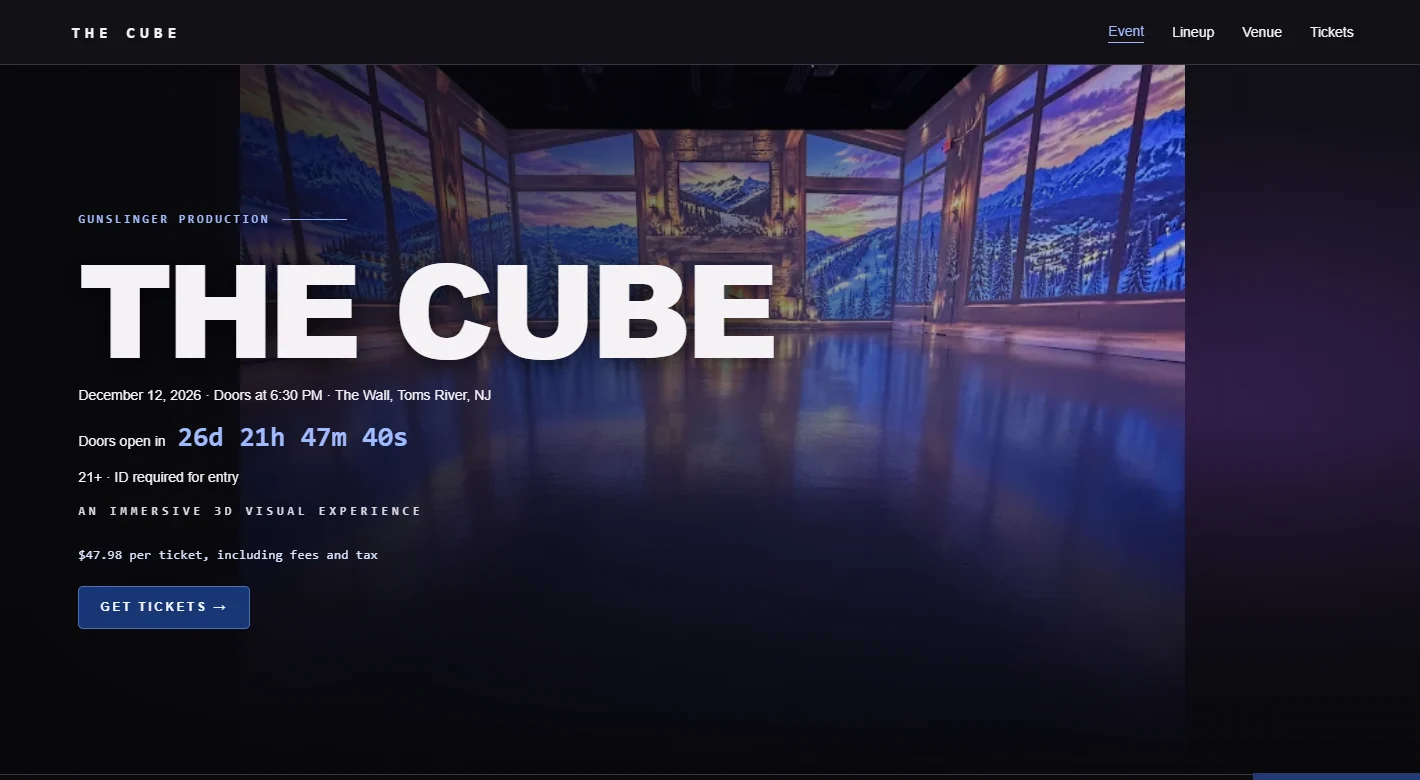
The Cube event website with the venue and ticket button The CubeEvent site and ticket sales
01 — What we build

Everything you carry in your head, in one system

One system, end to end: a front door that brings the work in, one source of truth that runs it, and numbers that show how the business is actually doing.

A booking app knows your next appointment. A custom system knows your business.

Your front door, always open

Services, portfolio, and pricing presented your way, with booking, quote intake, and deposits built in.

No lead falls through

Every quote and consultation tracked from first contact to approval; intake answers flow straight into proposals and production requirements.

One calendar, no surprises

Jobs move through defined stages with clear ownership; installs, deliveries, staff, and appointments coordinated in one calendar with automatic customer confirmations.

No surprise shortages

Know what is on hand, what each job consumes, and what needs attention before a shortage stops the work.

No chasing payments

Invoices generated from the actual job. Deposits, balances, and payment reminders go out on their own.

Your month in numbers

Volume, revenue, seasonality, and repeat customers, from your own data, ready when a decision needs them.

Built around your workflow, your terminology, and your way of qualifying and pricing work; every build is different.
02 — Case studies

What it looks like when the owner isn’t the system

See how an event promoter sells tickets and how a florist runs event production.

Case study

The Cube — Event publishing and ticket sales

Guests buy tickets online. Staff update the lineup and track sales from a private dashboard.

What guests see

A branded event page shows the date, venue, lineup, and schedule. Guests choose tickets in Ticket Tailor, pay through Stripe, and receive tickets from Ticket Tailor.

What the team manages

Staff update event details, artwork, lineup, and links in a private editor. They can review event orders and discounts from Ticket Tailor, while artists can copy referral links and see their own sales totals.

3-minute narrated walkthrough with on-screen captions. Staff screens use fictional demo data. Checkout and check-in are simulated.

Visit The Cube website

Case study

Event florist, 20-30 events a month

One consultation feeds the proposal, staffing plan, floral recipes, and packing list.

Before

A consultation form with more than fifty fields captured everything a client said, and fed nothing. The answers sat in an inbox while proposals, invoices, staffing plans, packing lists, and floral recipes were re-created by hand for every event. At twenty to thirty events a month, that is not administration; that is a second full-time job.

Now

One system manages the full lifecycle of every event, from consultation and deposit through staffing, floral recipes, packing, execution, invoicing, and final payment. The consultation converts directly into proposals, invoices, production requirements, and event documentation, so nothing is typed twice. Automated reminders keep payments, staffing, and deadlines on track without anyone chasing.

System walkthrough: event florist

Two minutes, narrated: the system described above, in daily use from first customer contact to the invoice. Client details are obscured throughout.

03 — Process

From your head into a system your team runs

No software demos, no pressure, and no obligation at any step. This is the full path from first conversation through launch and ongoing support.

1

Discovery call

A straightforward conversation about how your business runs today: how work comes in, how it gets scheduled, where things fall through the cracks. You leave with an honest read on whether a custom system makes sense for you; if it does not, we will say so.

2

Workflow design

We document your operation before anything is built: your stages, terminology, responsibilities, and where automation earns its keep. You review and approve the design before a line of it becomes software.

3

The build

The system is built around the approved design, and you see it take shape as it comes together. Feedback during the build is part of the process, not an interruption of it.

4

Launch and training

Your team learns the system hands-on, and we stay close through the first weeks of real use, when the small adjustments matter most.

5

Ongoing partnership

The system is hosted, maintained, and improved on an ongoing basis. As the business grows and the workflow changes, the system changes with it.

04 — Who builds it

Built by an operator, not a vendor

Data Dojo Group is run by Moe Banash, a former COO who scaled a company from $1M to $7M in revenue in two years and grew the team from 4 to 15+. Not a software vendor reading a script: an operator who has owned P&L, run warehouses, managed fabrication, and personally built the systems shown above. He knows what it feels like when growth adds operational weight faster than it adds capacity. The work is built from that operator’s perspective, not from a software feature list.

05 — Start here

Tell us what is keeping you up at night

Send a sentence or two about what your business does and what you are tired of carrying.

What getting started takes from you

  • A walkthrough of how your business runs today, in your own words.
  • Access to whatever you use now: spreadsheets, forms, calendars, notebooks. All of it is useful.
  • A few hours of your time spread across the build, mostly for feedback.

No technical knowledge required. You bring the business knowledge; we bring the system.